PG SQL and Power BI work flow that will save you tons of time & nerves and wont kill your mental health.
Imagine you have an SQL script. Maybe it s really huge. Even if it s tiny: most likely you will use 'copy-paste' turbo combo to edit the script and insert into PowerQuery editor (as custom SQL to retrieve the data).
The problem.
I wonna offer you one great solution (really it s HUGE) which will save your visual attention capacity, nerves, minimize manual work and jumps between screens / windows.
So you have a really huge SQL that you work on and keep jumping back and forth between the SQL IDE and PowerQuery advanced editor? Basically you keep repeating the same stupid operation many times: edit SQL -> copy -> paste into PQ -> refresh dataset. Or probably you need to share this script with someone else in your team/company ? Or you just need to quickly update some logic? So what i m trying to say is that there are two instances you jump between and this may be really time consuming and annoying when you have to 'alt-tab' between two windows.
Here s a sample SQL code:
                /*
                    sample SQL query here (maybe really huge and hardly managable)
                */
                select
					a."ACCOUNTINGDATE"::date 																								_acc_date
					,round(coalesce(a."ACCOUNTINGCURRENCYAMOUNT INV" * e."Exrate", a."REPORTINGCURRENCYAMOUNT INV")::numeric,3)				_amount_usd
					,round(coalesce(a."ACCOUNTINGCURRENCYAMOUNT INV",a."REPORTINGCURRENCYAMOUNT INV")::numeric,3)							_amount
					,upper(a."Name")																										_oper_type
				from public."dax__SAB_TGTGeneralJournalAccountEntryEntityStaging" a
                left join public."dax__ExRateMaster_daily" e
				    on a."ACCOUNTINGCURRENCY" = e."FROMCURRENCY"
				    and a."ACCOUNTINGDATE" = e."STARTDATE"
				    and e."TOCURRENCY" = 'USD'
The Solution
To get rid of jumping, copy-pasting routine you need to:
- Use your SQL IDE (i d recommend DBEAVER)
- Setup your SQL Git repo table like here (SQL repo)
- Wrap your SQL code in Code number 1
- Run Code number 2 to update the SOURCE table (which will host your SQL and serve as local in-DB Git repo.
- Create this PowerQuery source query (Code number 3) to retrieve SQL code as a string for further usage
- Create another PowerQuery query (Code number 4) that will utilize the SQL string from the previous query and execute it
The Code base
SQL source table DDL
I created a simple table to host my scripts. It basically has columns:- id - primary key
- _report - the name of the report it s used in
- _page - page name if this is specific to a page
- _code - the SQL SOURCE CODE itself
- _comment - any crap you will want to write here
- _updated - updated TS (simply uses now() function when a record is updated)
    create table public.sql_source (
        id int4 generated always as identity( increment by 1 minvalue 1 maxvalue 2147483647 start 1 cache 1 no cycle) not null
        ,_report text not null
        ,_page text default 'unnamed_script'::text not null
        ,_code text not null
        ,_comment text null
        ,_updated timestamptz default current_timestamp null
        constraint sql_source_pkey primary key (id)
            );
Code number 1 (setter-wrapper)
- Creates a custom namespace dev (you can literaly choose any name you want)
- Sets a local variable total_revenue_view and assign the code below to this var
- Wraps the code in $sql$ quotes (you can use this type of quotes to avoid issues with single/double classic quotes in your code; between Dollar signs you can use almost any name)
    set dev.total_revenue_view =
    $sql$
            select * from table

    $sql$
Code number 2 (updater)
- Grabs the code from the variable
- Updates the sql_source table with the code from the variable
- public.sql_source is the SOURCE table hosting the code base
- current_setting('dev.total_gp_view') is a PG SQL function that retrieves the value of the variable from the one you used in the previous step
- where condition is where you specify which record to update with the new SQL
    update public.sql_source
    set _code = current_setting('dev.total_revenue_view')
        ,_updated = now()
    where _name = 'TOTAL REVENUE' and _report = 'GP CONTRIBUTION';
Code number 3 (PowerQuery source query)
- Retrieves the SQL as a string from the sql_source table
- Used as a base query to retrieve and store the SQL code but not to be loaded into the model
- Basically you just need to get the content from the cell that stores the SQL source code and then use it as a string to feed into PQ query
    let
        Source = PostgreSQL.Database("c-powerbicosmos.k4mjimliu3npzv.postgres.cosmos.azure.com", "powerbi"),
        selectRows = Table.SelectRows(Source, each ([Schema] = "public") and ([Name] = "public.sql_source")),
        _dropCols = Table.SelectColumns(selectRows,{"Data"}),
        _expandData = Table.ExpandTableColumn(_dropCols, "Data", {"_code", "_name"}, {"_code", "_name"}),
        _selectTable = Table.SelectRows(_expandData, each ([_name] = "TOTAL REVENUE"))
    in
        _selectTable
Code number 4 (PowerQuery data retrieval)
- Queries the DB using the SQL code retrieved from the sql_source table (previous step)
- Instead of copy-pasting the code you use the string from the previous query
    let
        Source = PostgreSQL.Database("c-powerbicosmos.k4mjimliu3npzv.postgres.cosmos.azure.com", "powerbi",
        [Query =

                TOTAL_REVENUE_SQL_SOURCE[_code]{0}

        ])
    in
        Source
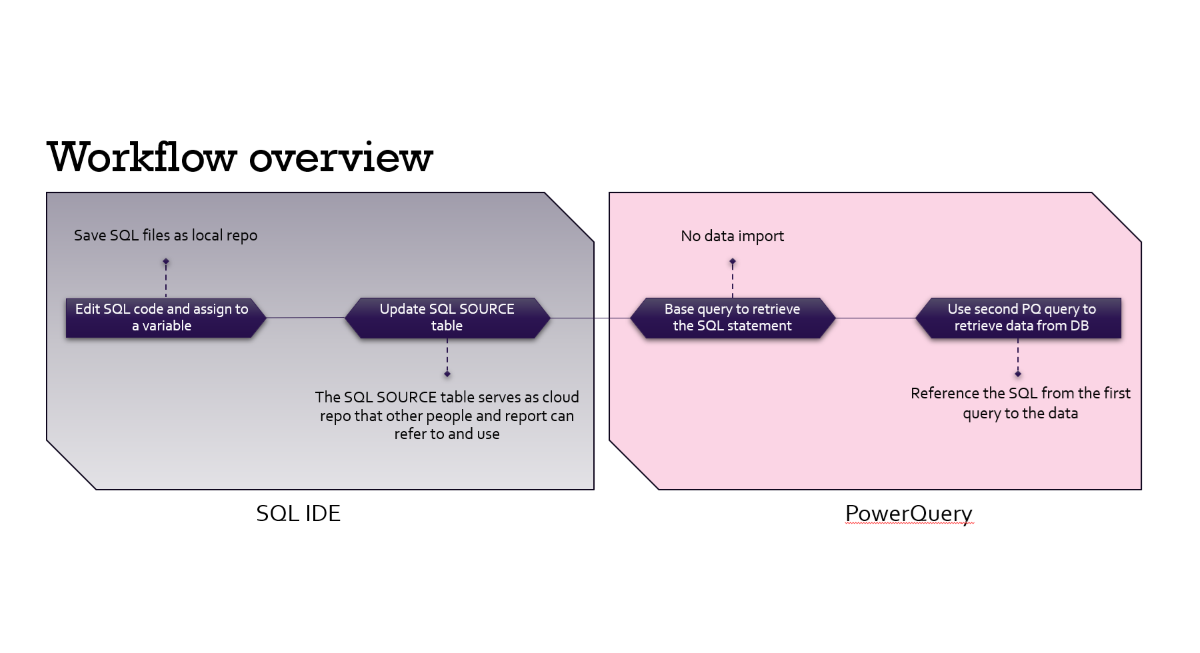
Workflow overview (conclusion)
Now a quick go through:- You amend your code. If you are using DBEAVER (which i recommend) then you can just comment the first "$sql$" quote tag and edit / test your code to check the results. When you finish editing you uncomment the first "$sql$" quote tag and run the Code number 1 & Code number 2 to update the SQL code in the source table. And it s a good practice to press CTRL + S to save the file after editing.
- Once the code is in the source table you can refresh the dataset (or just one table).